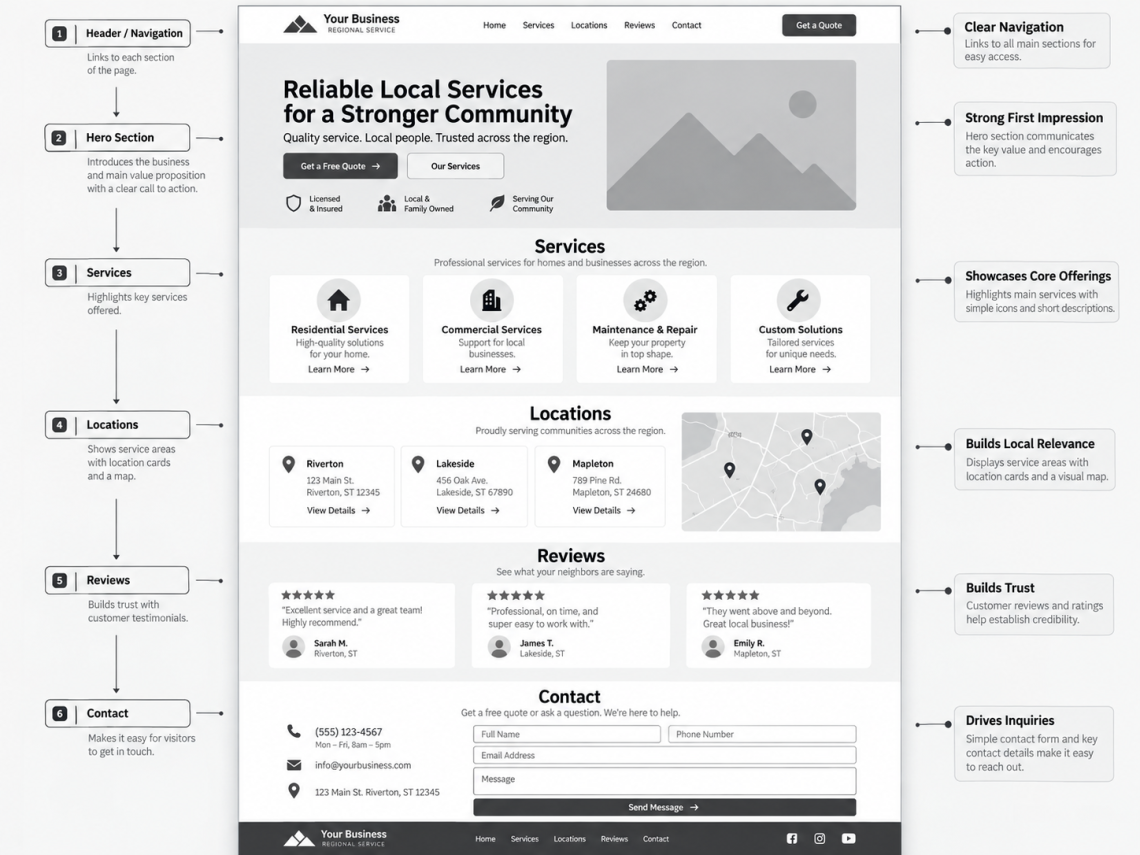
It needs to help potential customers understand the business, and it needs to
give search engines enough structure and context to understand the site’s
services, locations, and purpose.
A website can look polished and still perform poorly in search.
It can also rank for some keywords while doing a poor job of converting
visitors into customers.
The strongest local business websites balance search visibility, usability,
clarity, and conversion.
What Makes a Local Business Website Different?
A local business website usually serves customers within a defined geographic
market.
That means the site needs to communicate two things very clearly:
- What the business does
- Where the business provides those services
A national informational website may not need to emphasize geography.
A local plumber, law firm, dentist, contractor, salon, or restaurant usually
does.
Start With the Real Business Structure
The website architecture should reflect the actual business.
Before building pages, identify:
- The primary services
- The secondary services
- The physical locations
- The actual service areas
- The main customer actions
- The most important business information
This prevents the website from becoming a collection of pages created only
around keywords.
Build the Website Around Core Customer Needs
A useful local website should answer basic questions quickly.
A visitor should be able to understand:
- What the company does
- Whether it serves their area
- Which services are available
- Why they should consider the business
- How to contact it
If visitors have to search through several pages just to understand the basic
offer, the site structure needs improvement.
The Homepage Should Explain the Business Clearly
The homepage should represent the business as a whole.
It should not be built around one exact-match keyword at the expense of the
customer experience.
A strong local homepage commonly includes:
- A clear description of the business
- Main services
- Primary service area
- Trust elements
- Important calls to action
- Links to core service pages
- Business contact information
The goal is to help both users and search engines quickly understand the site’s
main purpose.
Do Not Try to Make the Homepage Rank for Everything
One common mistake is attempting to target every service on the homepage.
A contractor may offer:
- Roof repair
- Roof replacement
- Siding installation
- Gutter installation
- Storm damage repair
Trying to optimize one page equally for all five services can create a vague
page.
The homepage can introduce those services and link to dedicated pages where each
topic receives the depth it deserves.
Create Dedicated Pages for Important Services
Important services generally deserve their own pages when they represent
distinct customer needs.
For example, an HVAC company might use:
- /ac-repair/
- /heating-repair/
- /hvac-installation/
- /hvac-maintenance/
Each page can then focus on one clear service.
What Should a Service Page Include?
A useful service page should provide enough information for a visitor to decide
whether the business can help.
Common elements include:
- A clear explanation of the service
- Common problems or situations
- Who the service is for
- How the process works
- Geographic availability
- Relevant FAQs
- Contact or booking options
The page should be useful even if the visitor arrived without knowing anything
about the company.
Avoid Thin Service Pages
A service page should not exist only because a keyword tool found a phrase.
Weak service pages often contain:
- A short generic introduction
- Repeated city names
- Minimal useful information
- The same text as other pages
If two services are nearly identical and customers treat them as the same need,
one stronger page may make more sense than two weak pages.
Use Location Pages Carefully
Location pages can be useful when a business serves several meaningful
geographic areas.
But they are also one of the easiest parts of local SEO to overbuild.
A location page should exist because there is enough useful information to
justify it.
Physical Location Pages and Service-Area Pages Are Different
A company with a real office in a city has a different relationship with that
location than a company that merely travels there to provide service.
The website should communicate that difference accurately.
For example:
Our Louisville office
is appropriate when the business actually operates a Louisville office.
But:
Serving customers throughout Louisville
is more accurate for a service-area business without a physical office there.
Do Not Create Fake Local Offices
Local SEO does not require inventing locations.
A website should not claim offices, branches, or storefronts that do not exist.
Build geographic relevance around the real service area instead.
What Makes a Location Page Useful?
A stronger location page might include:
- Services available in that area
- How the company serves local customers
- Relevant service limitations
- Local project examples where genuine
- Area-specific FAQs
- Accurate contact information
Simply changing the city name in the same template is not enough to make a page
meaningfully different.
Avoid the City Page Factory
A common pattern looks like this:
10 services × 20 cities = 200 pages
This may create a large website quickly.
It may also create hundreds of pages with nearly identical content.
Before creating a location page, ask whether the page can provide distinct
value.
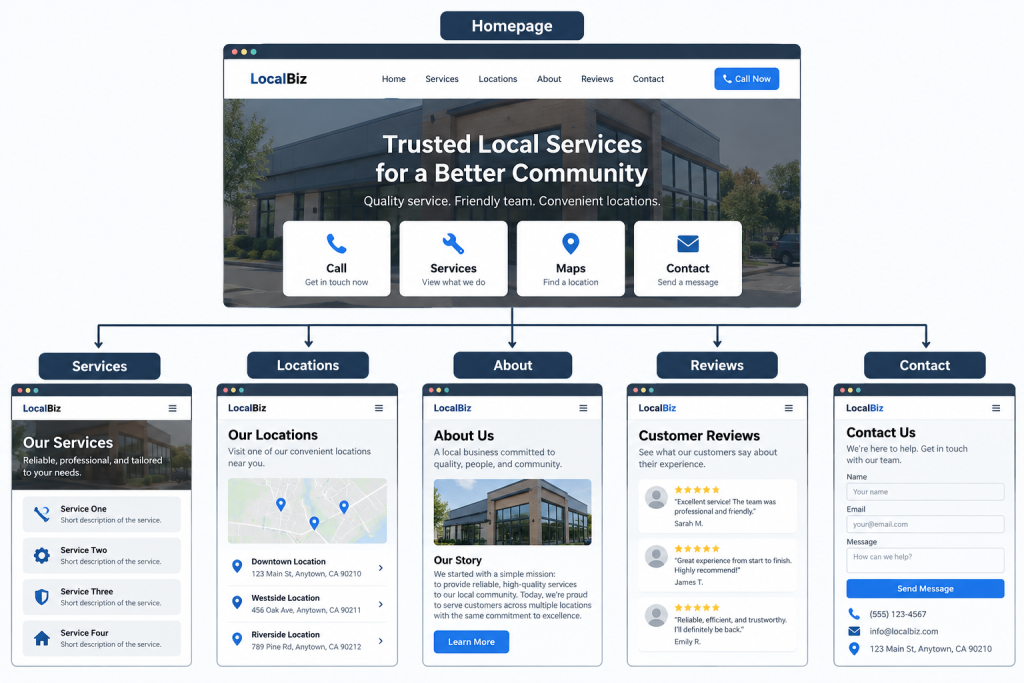
Keep Navigation Simple
Local business websites usually do not need complicated navigation.
A clean primary menu might include:
- Services
- Locations
- About
- Resources
- Contact
The exact labels depend on the business, but important commercial pages should
be easy to reach.
Important Pages Should Not Be Buried
If a key service page requires five clicks from the homepage, the architecture
may be unnecessarily deep.
Important pages should usually be accessible through logical navigation and
internal links.
Use Internal Links to Show Relationships
Internal links help visitors move between related pages.
They also help search engines understand how the site’s topics are connected.
For example:
Homepage → HVAC Services → AC Repair → Emergency AC Repair
Or:
Roof Leak Guide → Roof Repair Service → Louisville Service Area
Links should be added where they are useful, not simply to increase the number
of internal links on a page.
Use Descriptive Anchor Text
Internal links are easier to understand when the anchor text communicates the
destination.
For example:
Learn more about our roof repair service
is generally more descriptive than:
Click here
Anchor text should remain natural and useful to readers.
Create a Clear URL Structure
URLs should be simple enough for humans to understand.
Examples:
- /roof-repair/
- /ac-repair/
- /locations/louisville/
- /resources/roof-replacement-cost/
Avoid unnecessarily long URLs filled with repeated keywords.
Keep Important Business Information Consistent
Local websites frequently display:
- Business name
- Address
- Phone number
- Opening hours
This information should remain accurate across major parts of the site and the
business’s important external profiles.
A phone number that differs between the header, footer, contact page, and Google
Business Profile creates unnecessary confusion.
Use the Footer for Useful Information
A local business footer can provide useful persistent information without
becoming a keyword block.
Depending on the business, it may include:
- Business name
- Phone number
- Main location
- Hours
- Important service links
- Privacy policy
- Terms
Avoid stuffing dozens of city names into the footer purely for SEO.
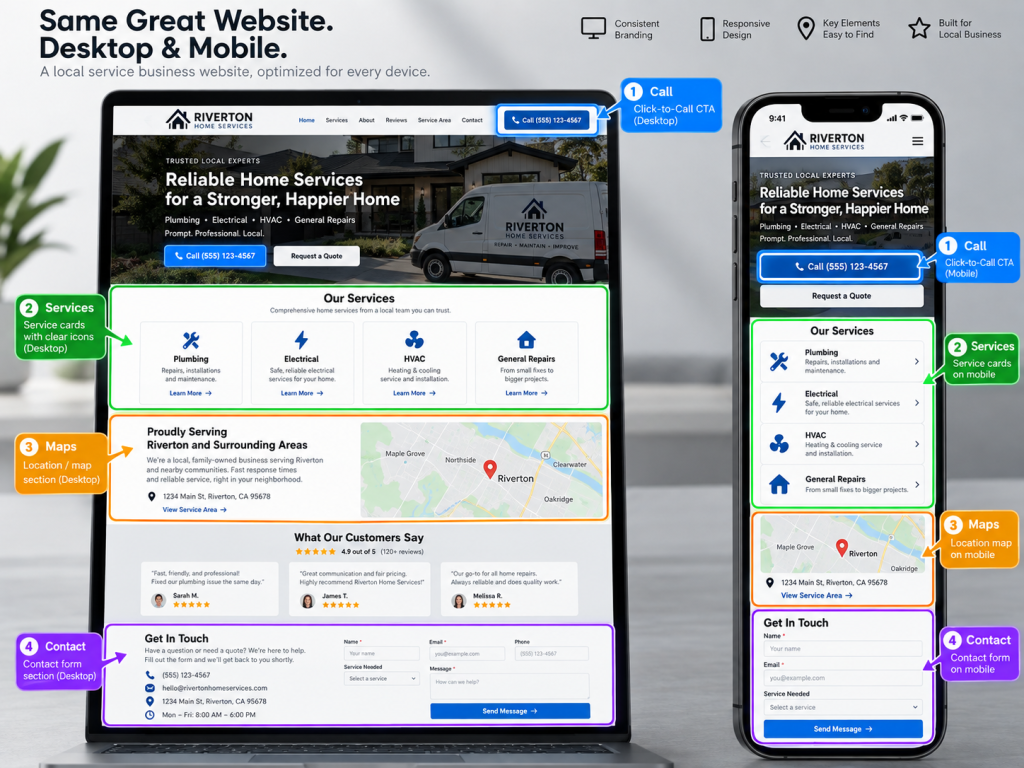
Mobile Usability Is Essential
Many local searches happen on phones.
A potential customer may be trying to contact a business immediately.
The mobile site should make it easy to:
- Read the page
- Call the business
- Navigate services
- Submit a form
- Book an appointment
- Find location information
Small text, overlapping menus, and difficult forms can reduce the value of
otherwise strong search visibility.
Make Phone Numbers Easy to Use on Mobile
If calls are important to the business, phone numbers should be easy to find and
tap.
Do not make mobile visitors copy a number manually when a direct call action can
be provided.
Keep Contact Forms Simple
A form should ask only for information that is actually needed.
For many local businesses, that may include:
- Name
- Phone or email
- Service needed
- Short message
A long form can create unnecessary friction before the business has even spoken
with the customer.
Calls to Action Should Match the Business
Different local businesses need different conversions.
Examples include:
- Call now
- Request a quote
- Schedule service
- Book an appointment
- Make a reservation
- Get directions
Do not use the same generic call to action on every business website.
Page Speed Matters to Users
A local business website should load quickly enough that visitors can use it
without unnecessary delay.
Common causes of poor performance include:
- Oversized images
- Heavy page builders
- Too many scripts
- Unnecessary plugins
- Large video backgrounds
- Poor hosting configuration
Performance work should focus on creating a usable site, not chasing a perfect
test score while breaking important functionality.
Optimize Images Properly
Large unoptimized images can slow down local websites significantly.
Review:
- Image dimensions
- File size
- Modern image formats where appropriate
- Lazy loading
- Descriptive alt text
Alt text should describe the image rather than become another place to repeat
keywords unnaturally.
Technical SEO Provides the Foundation
Content cannot perform well if important pages are inaccessible to search
engines.
Technical areas worth reviewing include:
- Crawlability
- Indexing
- HTTPS
- Canonical URLs
- Redirects
- XML sitemaps
- Robots directives
- Broken links
- Mobile usability
Make Sure Important Pages Can Be Indexed
A surprisingly common problem is an important service page being accidentally
set to noindex.
Other issues may include:
- Blocked crawling
- Incorrect canonical tags
- Redirect loops
- Broken pages
- Duplicate URLs
Technical checks should be part of any serious local website review.
Use XML Sitemaps as a Discovery Aid
An XML sitemap can help search engines discover important website URLs.
It should contain canonical pages that the site actually wants indexed.
A sitemap does not guarantee ranking or indexing, but it can help provide a
clearer list of important URLs.
Use Canonical URLs Correctly
Canonical tags help indicate the preferred version of similar or duplicate URLs.
On a simple local business website, canonical configuration should usually be
straightforward.
Problems often arise when plugins, staging copies, filters, or duplicated pages
generate unexpected canonical URLs.
Structured Data Can Add Context
Structured data can help machines understand information represented on the
website.
Depending on the site, relevant markup may describe:
- The organization
- The local business
- Addresses
- Contact information
- Breadcrumbs
- Articles
Structured data should match information that is actually present and accurate.
Do Not Treat Schema as a Shortcut
Adding structured data does not replace:
- Useful service pages
- Accurate business information
- Good internal linking
- Strong website structure
- Relevant local content
Schema is supporting information, not a replacement for the website itself.
Create Trust Through Real Business Information
Potential customers want evidence that the company is real and credible.
Useful trust elements may include:
- Real business information
- Relevant credentials
- Team information
- Project examples
- Customer reviews
- Clear policies
- Accurate contact details
Only include claims the business can genuinely support.
Do Not Invent Awards or Credentials
Trust signals lose their value when they are fabricated.
Do not claim:
- Fake awards
- Fake memberships
- Fake certifications
- Fake office locations
- Fake years in business
- Fake customer numbers
A simpler website with accurate information is stronger than one filled with
unverifiable claims.
Reviews Should Support the Website Experience
Customer reviews can help visitors understand the experiences of other
customers.
If reviews are displayed on the website, represent them accurately.
Do not create fictional testimonials and present them as real customers.
Use Local Content Strategically
A blog or resource section can support a local business website when it answers
questions customers actually ask.
Useful topics may include:
- Common service problems
- Maintenance questions
- Pricing considerations
- Repair versus replacement decisions
- Local regulations relevant to the industry
- Seasonal issues
Content should support the site’s primary services instead of becoming a random
collection of unrelated articles.
Connect Informational Content to Commercial Pages
A blog article should not always end as an isolated page.
If an article explains a problem that the company solves, link naturally to the
relevant service page.
For example:
Why Is My Water Heater Leaking? → Water Heater Repair Service
This helps visitors move from research to action.
Avoid Publishing Content Just to Make the Site Larger
More pages do not automatically create a better website.
Every page should have a reason to exist.
Ask:
- Does this page satisfy a distinct search or customer need?
- Does it provide information not already covered elsewhere?
- Does it fit the business?
- Can it be maintained?
Use a Logical Heading Structure
The page title usually serves as the main page heading.
The body can then use H2 and H3 headings to organize major and supporting
sections.
Headings should help readers scan the page.
They do not need to repeat the target keyword in every section.
Write Titles for Searchers, Not Just Search Engines
A page title should communicate what the page offers.
For example:
Roof Repair in Louisville, KY | Business Name
is more useful than:
Best Roof Repair Louisville KY Roofer Roofing Company Louisville
Clarity usually creates better titles than keyword repetition.
Meta Descriptions Should Support the Click
A meta description can summarize the value of the page and encourage the right
searcher to visit.
It is not necessary to fill the description with every keyword variation.
Explain what the visitor can expect to find.
Measure Website Performance Beyond Traffic
Traffic is useful, but a local business website usually exists to generate
customer actions.
Measure outcomes such as:
- Phone calls
- Form submissions
- Bookings
- Quote requests
- Appointments
- Direction requests
A page receiving less traffic but generating qualified leads may be more
valuable than a high-traffic article with no commercial relevance.
Use Search Console to Understand Search Visibility
Search Console can help reveal:
- Queries generating impressions
- Pages receiving organic clicks
- Indexing issues
- Search performance changes
This information can help identify pages that need improvement or areas where
the site is gaining visibility.
Review Analytics by Landing Page
Looking only at total website traffic can hide important differences.
Review individual landing pages to understand:
- Which service pages attract visitors
- Which articles support customer journeys
- Which pages generate conversions
- Which pages receive traffic but fail to create engagement
Maintain the Website After Launch
Local business websites are not finished permanently after launch.
Businesses change.
Services change.
Employees change.
Locations change.
Phone numbers and opening hours can change.
Review important pages periodically to keep information current.
Remove or Update Outdated Information
Outdated business information can directly harm customer experience.
Review:
- Old services
- Former employees
- Closed locations
- Old phone numbers
- Expired promotions
- Outdated operating hours
Keeping old content online simply because it once ranked is not always the best
choice.
A Simple Local Business Website Structure
A service business might begin with a structure like this:
- Homepage
- About
- Services
- Individual Service Pages
- Locations or Service Areas
- Resources or Blog
- Contact
- Privacy Policy
- Terms
The site may need more or fewer sections depending on the business.
Architecture should follow real customer and operational needs rather than a
fixed SEO template.
Local Website SEO Checklist
| Area | What to Check |
|---|---|
| Homepage | Clearly explains the business and service area |
| Services | Important services have useful pages |
| Locations | Only real locations or genuine service areas are represented |
| Navigation | Important pages are easy to reach |
| Internal links | Related pages are connected logically |
| Mobile | Calls, forms, and navigation work well |
| Speed | Pages load without unnecessary friction |
| Indexing | Important pages are crawlable and indexable |
| Business information | Name, phone, address, and hours are accurate |
| Calls to action | Next steps are easy to understand |
| Content | Pages answer genuine customer questions |
| Measurement | Traffic and customer actions are tracked |
What Should You Build First?
If the website is starting from zero, prioritize the pages that explain the
actual business.
- Homepage
- Primary service pages
- Accurate contact or location information
- About information
- Important service-area pages where justified
- Technical foundations
- Supporting educational content
Do not publish fifty blog posts while the website still lacks a useful page for
its primary service.
A Local Website Should Make the Business Easier to Understand
Good local website SEO is not about making the site look like it was built for
an algorithm.
It is about organizing real business information in a way that both customers
and search systems can understand.
The services should be clear.
The geographic market should be accurate.
Important pages should be easy to find.
The website should work on mobile.
Technical problems should not prevent search engines from accessing useful
content.
And when someone is ready to become a customer, the next step should be obvious.
For a broader local search review, use the
Local SEO Checklist.
For Louisville-specific strategy, read the
Louisville SEO Guide.

